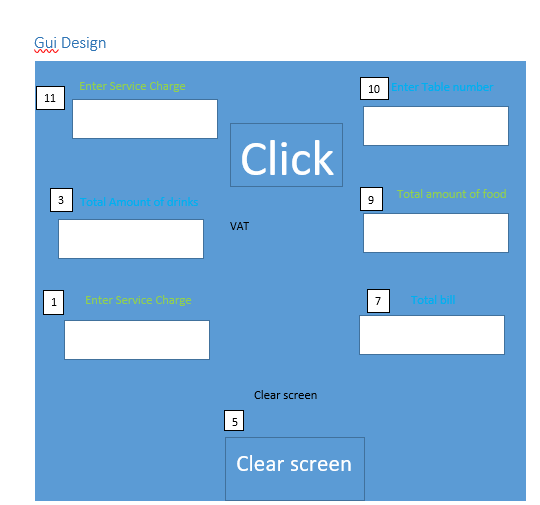
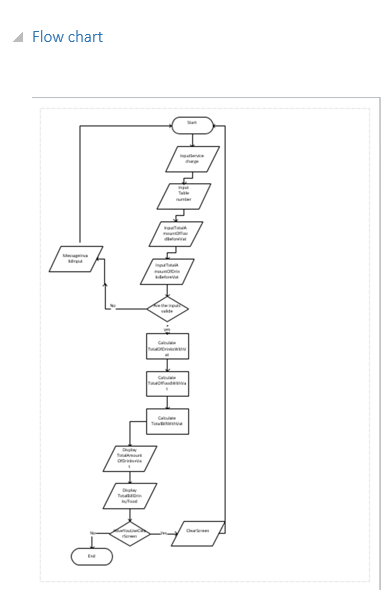
In unit it10 we will learn how to create an computer program by using graphical tools and develop skills in programming. The first task in IT10 was to create an Costfo calculator bill to be able to calculate the vat so basically the first task was all about planing get used to know with commands and introducing us to the topic the first thing we do was to find the purpose of the program the purpose of the program was to create an program that will calculate the vat for the final bills. In this task we have to include input requirements and output requirements this is used for to know what we have to put into our program the next thing was the GUI design in this task we have to create an design of how our program will look like then it was time for an flow chart we used to create an flow chart of how program will work down i will show you and screenshot of how flow chart look like. After that the task 1 was done. Task 2 was actually about writing the code to make the application work for this we used visio 2017 this program is used to create an code for basic programs the problems i have face with that is that i does not know anything about programming but with time and help with teachers i get used to it and did it right for grade of distinction the next thing was to put our gui designs in program this basically mean that we have to put our design into a program and make sure it runs correctly. After finishing the code we went through testing this means that we have to put what wen well in the program and what should be improved. In this task the trouble i faced was the design because i do not know how to create a design that will fir good but with days i ask teacher for help and then i sort everything
 Home page